
0.6.1 With you, every writing day

A quiet home for your writing

Find your words.
Keep writing.

Writing, reading, and listening. One creative workspace.
From a passing idea to a finished manuscript, give every draft and every day's work a place to belong.

No app accountNo social feedWrite offlineNo adsNo subscriptionOne-time Pro purchase

Mac · iPhone · iPad Pick up across Apple devices with iCloud

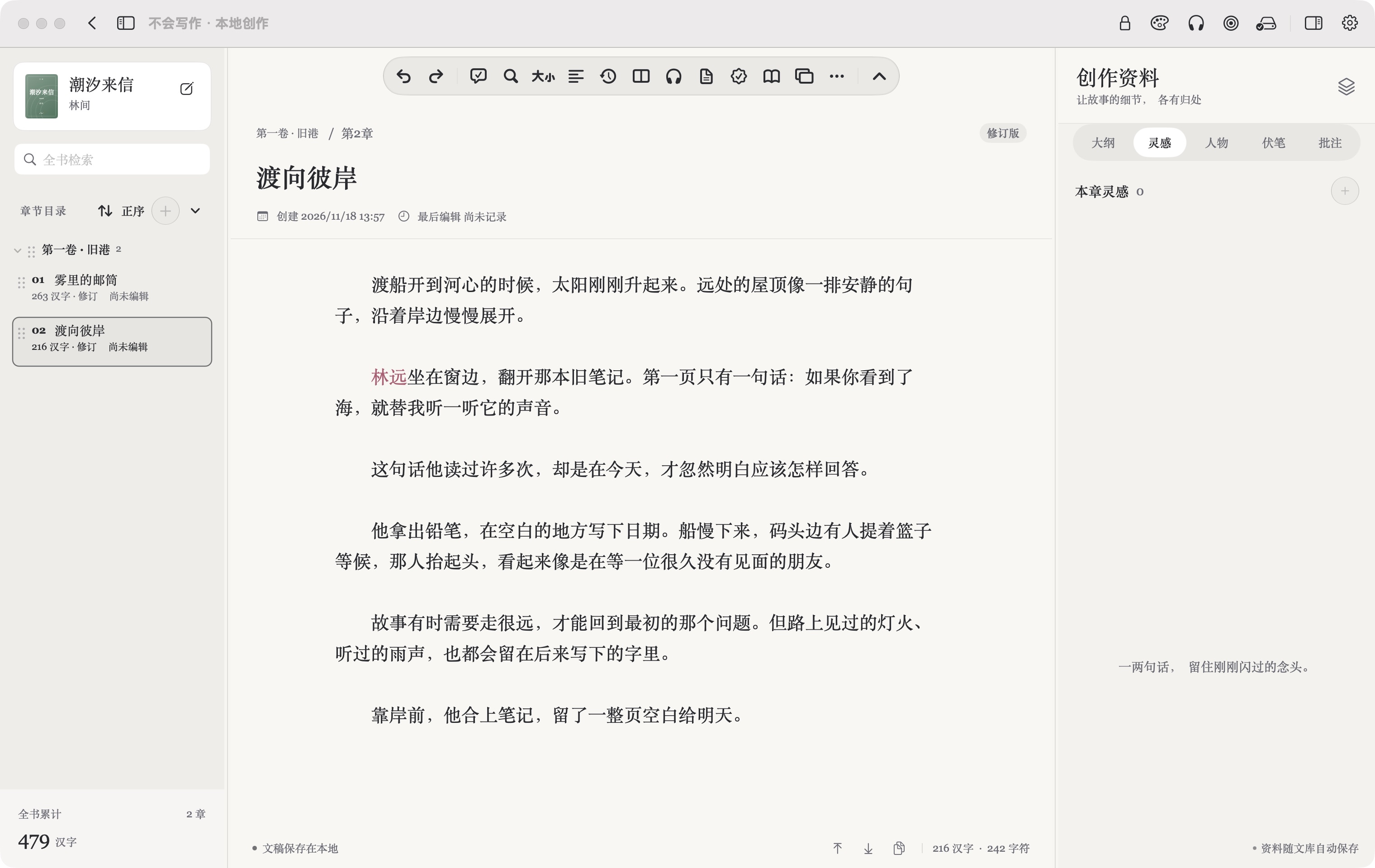
不会写作 app interface preview
Mac · Your writing workspace
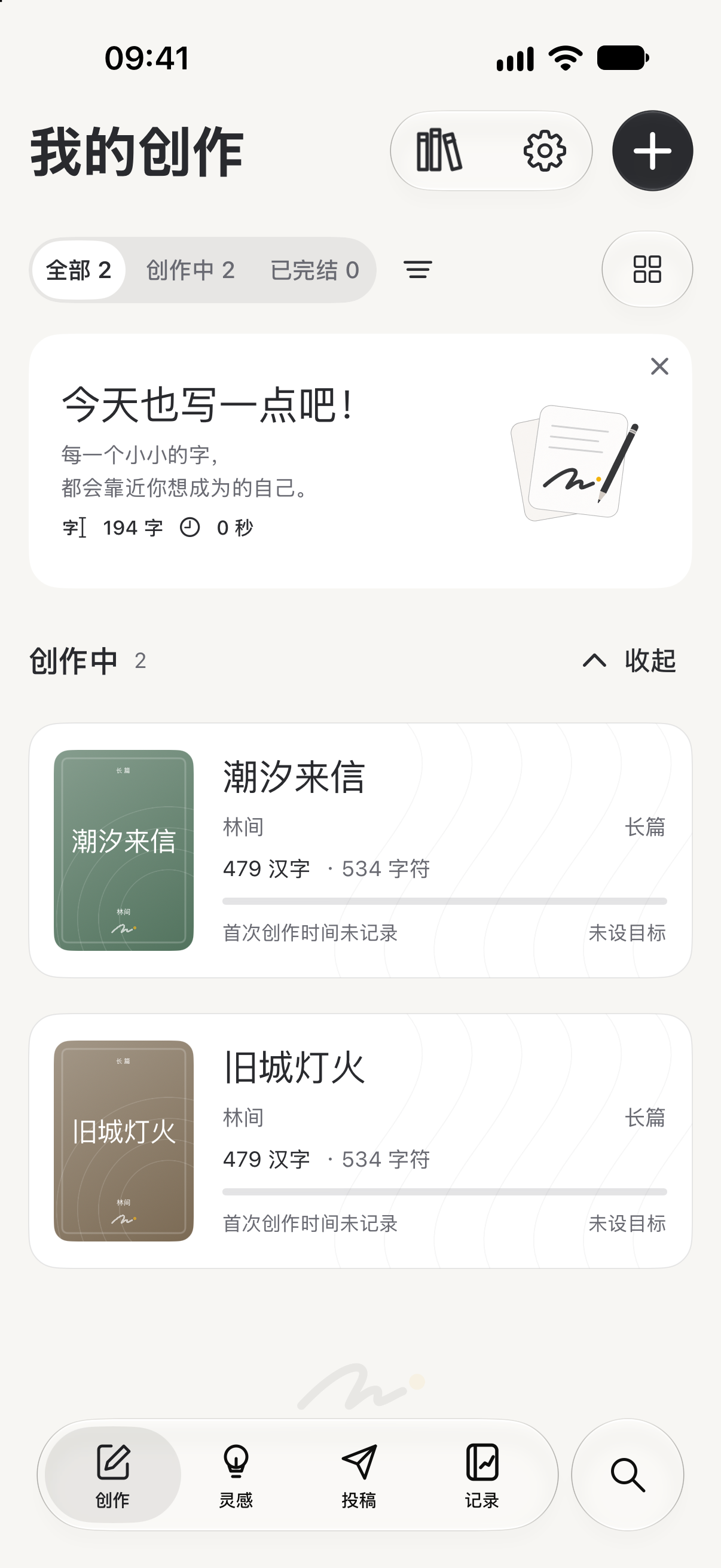
不会写作 app interface preview
iPhone · Keep your story moving
Every draft is part of the journey.
Explore your creative space ↓
No app account · No social feed Local storage · Offline writing Listen to your own stories Import and export your way

From the first line to the final draft

Every word,
part of a longer journey.

Keep your attention on the story.
Keep track of chapters, story threads, and every revision.

WRITE

Let the story take the lead.

Keep chapters in order and your page comfortable to read. Find, undo, and revisit earlier drafts whenever you need them.

Chapter One · After the Rain Saved

When the rain stopped, the lights along the river came on.

Summer stretched ahead. The story was only beginning.

Chapters and volumesFind and replaceSnapshots and revisions
ORGANIZE

A place for every story.

Organize short pieces, novels, volumes, and collections. Choose cover colors, patterns, and subtle textures to make the shelf your own.

NOVELRiver SummerLin Jian
Your story. Your colors.A different mood today.
More colors and patterns in the app
CAPTURE IDEAS

Give every idea a home.

Write it down before it slips away. Track its status and connect ideas, characters, and clues to the story they belong to.

To explore

What if the letter arrived ten years too late?

The beginning of a story
Used

The rain sounded like a letter waiting to be opened.

For River Summer
YOUR WRITING JOURNEY

Remember how you got here.

See your writing activity and follow a book from its first words through revisions to the finished manuscript.

Your journey · Time spent creating Book history · Beginnings and revisions Finished work · A record of every stage
READ AND LISTEN

Read it. Hear it. Make it better.

Preview your manuscript as a book, or listen in the dedicated player. Resume where you left off and hear the rhythm of your words.

After the RainYour story, read aloud
Uses Apple system voices. Downloaded offline voices work without a connection; downloading a voice requires internet access.
STORY THREADS

Give every clue its payoff.

Record a clue, where it appears, and how you plan to resolve it. Keep the connections in your story within reach.

Set upChapter 3 · The Unsent Ticket
Planned payoffChapter 10 · A Promise from Ten Years Ago
SUBMISSIONS

Follow the story beyond the draft.

One card per work, with multiple submissions inside. Update replies and see follow-ups due today, within seven days, or still unanswered.

River SummerAwaiting reply

A literary journal One work · Multiple submissions

SubmittedFollow upRecord the reply
IMPORT AND EXPORT

Your words, always yours to take.

Import TXT and DOCX manuscripts as works and chapters. Export TXT and Word for free. Pro adds Markdown, EPUB, and separate files for each chapter.

TXTDOCX
My works
Word · DOCXTXTMarkdown · EPUB (Pro)
Take your manuscript wherever it needs to go.
CHARACTER VOICES

Let each character sound different.

Assign voices to characters and confirm who is speaking. Hear the narrator and dialogue in distinct voices.

Narrator

The rain stopped. At last, the letter arrived.

Lin Xia

“I've waited a long time for this letter.”

Chen Yuan

“I'm glad it isn't too late.”

Confirmed speakers use their assigned voice; unassigned dialogue uses the narrator.
READING AND NOTES

Let your reading leave a trace.

Keep imported ebooks on a dedicated shelf, with reading progress and notes. A sentence or a sudden thought may become your next story.

Reading is part of creating
Reading progressNotes along the wayFinished books
All everyday reading backgrounds are free, including comfortable options for reading at night.
DAILY ACTIVITY

See the work you put in.

Track daily character counts and active writing time on your calendar. See your total activity or focus on a single book.

Today's writing · Example

1,260Chinese characters added

42 minActive writing time

Active time measures writing activity, excluding idle time and time away from the editor.
WRITING PLANS

Give your next draft a direction.

Set a target length and a planned completion date. Watch your novel or first draft move toward a goal at your own pace.

River SummerWriting plan · Example

32,000 / 80,000 characters

40% completeTarget date · December 31

Keep your stories in your hands

Your words,
a place of their own.

Your library stays on your device, so you can keep writing offline.
iCloud sync by default, plus independent backups and exports for peace of mind.

About your library and backups
My writing libraryWorks · Ideas · Story notes
Saved locallyBackup copy
Keep every draft close.

Export manuscripts or your complete library. Sync across Apple devices with iCloud, and keep an independent backup whenever you need one.

Local first. Connected with iCloud.

Open and write.
Pick up on another device.

The app manages your library for you.
No folders to create. No storage paths to remember.

On your device

Keep writing, even offline.

Drafts save automatically on your device. Write without internet or an app account. The developer cannot view your private library.

  • Automatic saving
  • Local library and protective copies
  • Free TXT and Word export
iCloud sync by default

The same story, across devices.

New libraries use Apple CloudKit by default when iCloud is available. Write a scene on your Mac, then continue on iPhone or iPad.

  • Use the same iCloud account
  • Your own private iCloud database
  • View status, pause, or reconnect in Settings

Sync requires internet and enough iCloud storage. Offline changes sync when your connection returns.

Independent backups

A copy you can take with you.

iCloud sync shares changes; an independent backup keeps a restorable copy. Export or restore a full backup in Library & Backups.

Export a backupKeep or restore your copy

If versions conflict, the app keeps protective copies and asks you to choose, rather than silently overwriting your work.

Are sync and backup the same?+

No. Sync keeps changes consistent across devices, including deletions. A backup keeps a copy from a particular moment. A backup exported to iCloud Drive is separate from your private CloudKit database.

Can I write without signing in to iCloud?+

Yes. Write, read, and export with a locally saved library. Connect sync when iCloud becomes available. Pro purchases use your App Store Apple Account; sync uses your system iCloud account.

The process is worth remembering, too

Today's revisions,
without losing yesterday's start.

From the first draft to revisions, final versions, and collections.
Keep a history of your drafts and the journey behind them.

01

Write and save

Keep saving your draft and bring ideas, characters, and story threads together.

02

Snapshots and revisions

Save snapshots at important moments, compare changes, and start a revision after finalizing a draft.

03

Finalize and archive

Organize finished work, collections, and submissions. Look back on your writing and the time it took.

Remember how each draft changed, and the time you gave it.

A clear choice

Start free.
Make it yours with Pro.

The basic version is free, with no ads.
You can always save, back up, and export your work.

Free and Pro feature comparison
What matters to youFreePro
Writing, chapters, and volumesFree to useAll free features included
Length, works, and chaptersUnlimitedUnlimited
Autosave, backups, and TrashIncludedIncluded
iCloud sync across Apple devicesIncludedIncluded
Reading, notes, and system voicesIncludedIncluded
Everyday reading backgroundsFree to useFree to use
TXT and Word exportFree to useFree to use
Markdown, EPUB, and chapter exportsFeatures visible before unlockingUnlocked
Export all writing books at onceFeatures visible before unlockingUnlocked
Characters, story threads, and revisionsFeatures visible before unlockingUnlocked
Submission follow-ups and writing insightsFeatures visible before unlockingUnlocked
All themes, character voices, and custom toolbarsFeatures visible before unlockingUnlocked

Applies to iOS, iPadOS, and Mac App Store versions. Pro features remain visible so you can understand them before unlocking.

Simple tools. A lasting home.

Start with your story.
Choose your tools as you go.

Download free and start writing.
If it feels right, support independent development with a one-time Pro purchase.

Pro · In-app purchase on the App Store
One-time purchase
Mac · iPhone · iPad

The app is free to download.
Actual Pro pricing depends on your App Store region.

Always free to startWriting, autosave, backups, and TXT and Word export stay free.
No ads. No subscription.No fees based on writing length. No monthly or annual renewal.
Pay once. Keep using it.Unlock Pro with an App Store in-app purchase.
One purchase across Apple devicesRestore your purchase on iPhone, iPad, and Mac using the same purchasing Apple Account.

All purchases go through the App Store. This website does not accept payments.

Explore the app by device and page

A different screen.
The same story.

Choose a device, then explore its features.
Browse the screens to see how it works.

macOS · 0.6.0 · Home / Shelf1 / 11

Screens show fictional work. Versions are shown in the captions. Android and Windows are development previews.

Find your writing space

Room for writing,
in your everyday life.

Spread out a story on your desktop. Capture an idea on your phone.
Find your rhythm with familiar controls.

macOSYour full creative workspaceNative desktop app+
  • See chapters, your manuscript, and story notes together.
  • Organize novels, short pieces, and collections on your shelf.
  • Chapters, volumes, story notes, final drafts, and revisions.
  • iCloud by default, independent backups, and writing history.
iPhone · iPadCapture ideas. Continue anywhere.Writing on the go+
  • Focus on your words; reveal chapter details when needed.
  • Save an idea or return to your unfinished story.
  • Search works, manuscripts, ideas, and submissions.
  • Native navigation with multi-step undo and redo.
AndroidFamiliar controls. Quiet focus.Development preview+
  • Familiar native Android controls and navigation.
  • Keep works, ideas, and submissions close at hand.
  • Cover colors and patterns that work with your theme.
  • Local libraries, document imports and exports, and copy transfer.
WindowsAn orderly home for shelf and draftDevelopment preview+
  • A native desktop shelf, writing workspace, and local library.
  • Organize works and chapters with familiar desktop controls.
  • Import manuscripts, keep editing, and export your words.
  • Local storage and library copies keep your work in your hands.

iCloud sync and App Store purchases currently apply to Apple devices. Android and Windows are development previews, outside this store release.

A writer's answer to a familiar question

Find your words.
Keep writing.

THE BEGINNING

I kept looking.
Then I decided to build it.

Before building 不会写作, I was a writer looking for the right tool. Safe drafts, organized books and revisions, finished work, and a record of time spent writing: these everyday needs became the reason to build it.

A home for each manuscript. A history for every draft.
A way to remember the days you spent writing.
Read the story behind the app

Every improvement, noted

The stories continue.
The tools keep getting better.

See what's changed and what might help your next writing session.

Read the updates
Every story starts with a mark.Find your words. Keep writing.

Let every word become a path that takes you further.

Saved locally · Synced with iCloud · No ads · No subscription